How to build a todo app with React and Firebase Database (3 Part Series)
1 How to build a todo app with React and Firebase Database 2 How to build a todo app with React and Firebase Database 3 How to build a todo app with React and Firebase Database
Day 1
📅 11-06-2019
🕐 1h
🏁 Initial setup and getting ready
Initial setup
I’m going to use create-react-app tool to scaffold the project folder. It’s a tool provided
by Facebook that allow to easy scaffold a pre-configured starter project.
npx create-react-app todo-app
The initial project consists of
node_modules: contains all necessary dependencies. It’s generated scaffolding the app withcreate-react-apptool (there’s anpm installinto it)public: contains few files like theindex.html, theapplication faviconand amanifestthat contains few basic application settingssrc: contains the code.gitignorepackage.json: there are all the project information like the version, the author and mainly the dependencies the application needs to work properlyyarn.lock: contains all the dependencies Yarn needs with relative versions

To run the starter basic application it’s enough to do
cd todo-app
npm start

npm start is one of several pre-configured commands I’m going to use to develop this
application. Other commands are:
npm testnpm buildnpm eject(stay away from it for now)
Get ready for components
In order to work with a sustainable and scalable structure, I like to keep things separated. I’m going to create two folders for components.
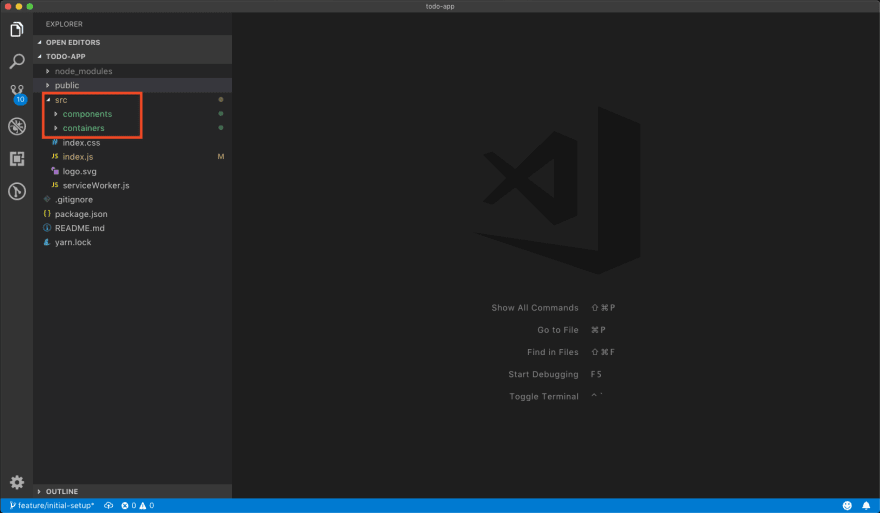
These two folders will contains (surprise) components!
The only difference between them is that a
container is a component that manages the application state so it’s a
stateful component. Other components are stateless components.
The
main component <App />
Let’s create the first component.
I’m going go to move the App.js,
App.test.js and App.css into their own folder ./containers/App/:

// App.js
import React, { Component } from 'react';
import './App.css';

class App extends Component {
  render() {
    return (
      <div className="App">
        Placeholder
      </div>
    );
  }
}

export default App;


/* App.css */
.App {
  text-align: center;
}
No changes to the App.test.js at the moment.
Update index.js - importing App component - because files location is changed and delete
useless files like logo.svg.
The
<Todo /> component
Let’s create the <Todo /> component into the ./components folder. Create
Todo.js, Todo.test.js and Todo.css.

// Todo.js
import React from 'react';
import './Todo.css';

const todo = () => (
    <div className="Todo">
        <p>Placeholder</p>
    </div>
)

export default todo;


/* Todo.css */
.Todo {} /* Empty for now */
Todo.test.js is similar to App.test.js:
import React from 'react';
import ReactDOM from 'react-dom';
import Todo from './Todo';

it('renders without crashing', () => {
  const div = document.createElement('div');
  ReactDOM.render(<Todo />, div);
  ReactDOM.unmountComponentAtNode(div);
});
Now I can use the <Todo /> component into the <App /> component,
doing:
import React, { Component } from 'react';
import './App.css';

import Todo from '../../components/Todo/Todo';

class App extends Component {
  render() {
    return (
      <div className="App">
        <Todo />
      </div>
    );
  }
}

export default App;
Check out the code here
 rossanodan / todo-app
Simple to-do app built with React.
This project was bootstrapped with Create React App.
How to run locally
git clone https://github.com/Phantasm0009/TodoList.git
cd todo-app
npm install
npm start